

HOME

SUPPORT

SHOPPING

LOCAL LINKS

CONTACT US

Microsoft Outlook Express/Outlook 2000 Settings
for SMTP Authentication
Outlook Express is the default mail client included with Windows 98, ME, 2000 and XP.

Step One:

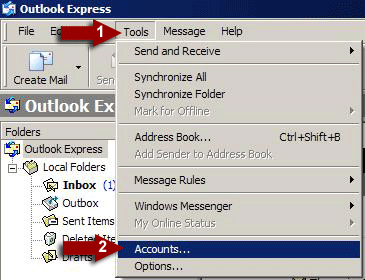
Open up your email program, Outlook Express. (1) Click on Tools and then (2) click on Accounts as shown:


Step Two:

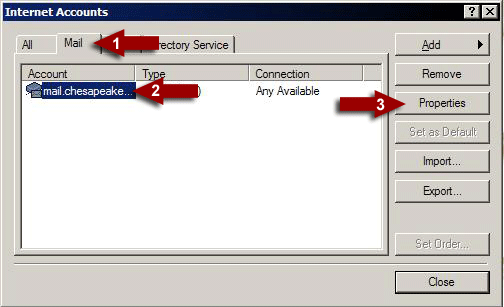
(1) Click on the Mail tab then (2) single click on your mail account. (3) Click Properties
(The default name for most users account is "mail.chesapeake" - If you have multiple accounts, you will need to repeat the following steps for all of them)


Step three:

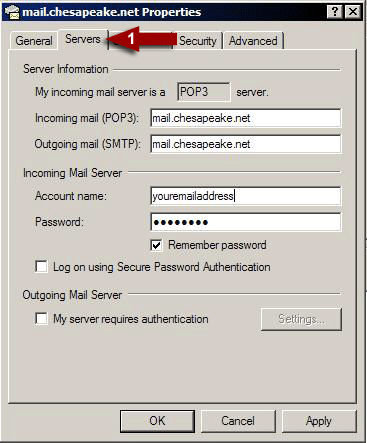
(1) Click on the Servers tab as shown.


Step Four:

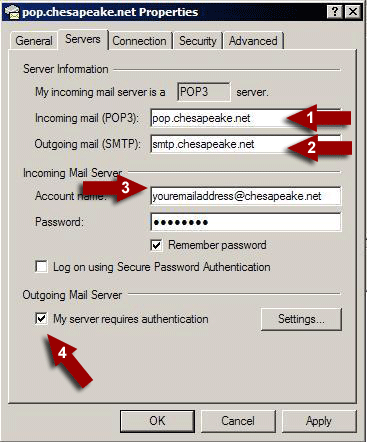
(1) Change the incoming mail server to "pop.chesapeake.net"
(2) Change the outgoing mail server to "smtp.chesapeake.net"
(3) Change the account name to your email address, including the
"@chesapeake.net"
(4) Add a check next to "My server requires authentication" Then click OK.