|
FTP/WEB INSTRUCTIONS FOR TIER 2 ACCOUNTS
Chesapeake.Net Tier 2 accounts come standard with 5 MB of web storage space. The storage space is accessible only to the primary email user name and password , so keep this in mind if you have more than one email account with Chesapeake.Net .
Your web site address is: http://www.chesapeake.net/webname
(Where "webname" is the name of your website, specified by you at the time of account signup)
To upload files to this web address you will need an FTP client program, such as CuteFTP or any of the clients listed on the CWS Applications page (we recommend CuteFTP 3.0, but any client listed on CWS will work). Once you have downloaded and installed an FTP client, you will need to configure it to connect to Chesapeake.Net .
The connection settings you will need to enter into your FTP program:
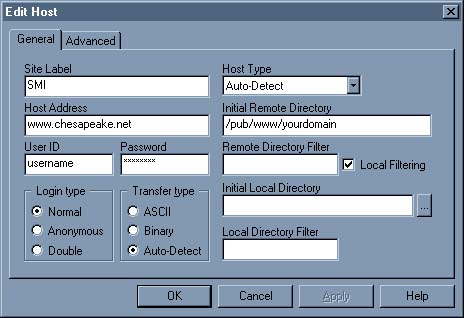
- Host Address: www.chesapeake.net
- User ID: Shell Account user name (See Account Setup Information sheet)
- Password: Shell Account password (See Account Setup Information sheet)
- Initial Remote Directory: /pub/www/webname
For instance, in CuteFTP 3.0, you would enter these settings like this:
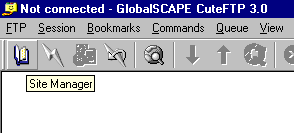
- First, click the Site Manger Button on the main button bar, as shown below.
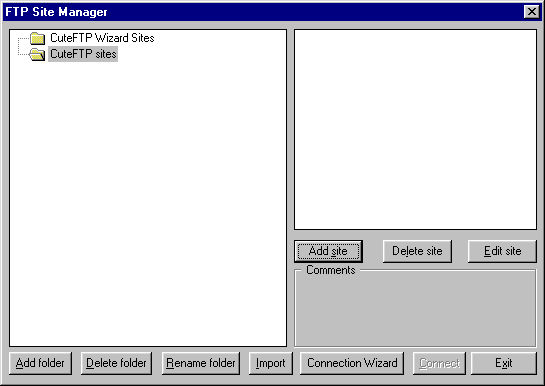
- Next, click the "Add site" button in the FTP Site Manager window.
- Finally, enter all of the information as shown below, and click "OK."
Please Note: Only files stored in the "/pub/www/webname" subdirectory of your Chesapeake.Net account are visible via your web site address.
This subdirectory is not visible from your root directory, and must be entered into the Initial Local Directory field of CuteFTP in order to view it, or you can manually change to this subdirectory using your FTP client.
If you are unsure how to access this directory using your FTP program, consult your client's online help, or contact Technical Support.
Directory names are case sensitive, and Tier 2 accounts have a 5 MB limit on the amount of data they can store in their Chesapeake.Net accounts.
Tier 2 users are not permitted to use CGI scripts of any kind on their personal web page, and there is a 100 MB limit on the amount of bandwidth your site can use. If your site transmits any more than 100 MB per month, $10 per each additional 100 MB will be charged to your account.
Please contact us at support@chesapeake.net if you require further information or assistance with yourChesapeake.Net e-mail service, or call our Technical Support staff at 1-877-764-4638.
All content and images copyright Southern Maryland Internet, Inc.
|